Click the photo below for access to a flow chart with a step by step process.
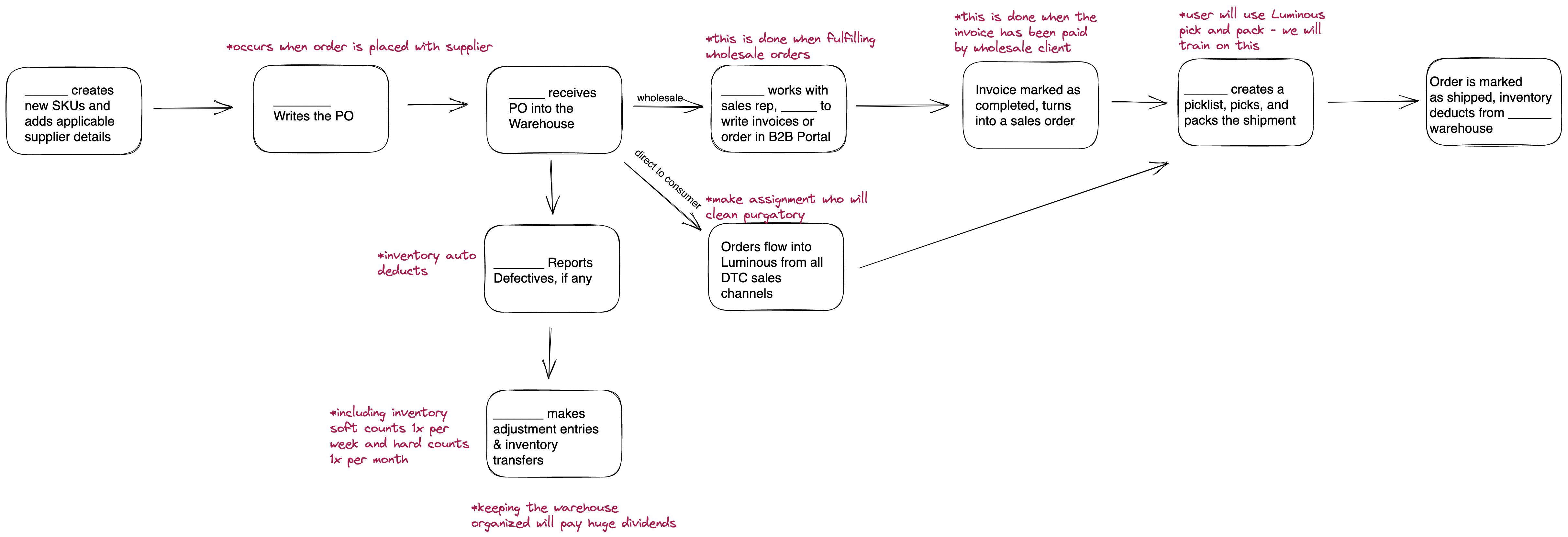
When implementing a system such as Luminous, it is important to understand the flow of how operations will work. While navigating the chart, insert names of team members that will be responsible for each step. More information is included below:
- Creating a SKU
- How to Edit/Add SKUs: /articles/how-to-manually-edit-or-add-sku-inside-luminous
- Managing Product Categories and Tags: /articles/how-to-manage-tags-and-categories
- Managing Kits: /articles/kits-kitted-skus-9668571097
- Master/Variant SKUs: /articles/how-to-assign-a-variant-sku-to-a-different-master-sku
2. Writing a Purchase Order
- How to Write a PO: /articles/how-do-i-create-a-purchase-order-in-luminous
- Product Reordering Breakdown: /articles/product-reordering-breakdown
- Purchases Page Overview: /articles/purchases
3. Receiving Inventory into Warehouse
- Receiving Overview: /collections/receiving
- Receiving Items from Separate PO's: /articles/how-to-receive-items-from-two-separate-purchase-orders
4. Defective Units:
- Writing a Defective Report: /articles/how-to-create-a-defective-report
5. Adjustment Entries, Inventory Transfers, & Warehouse Management:
- Adjustment Entries: /articles/adjustment-entries
- Inventory Transfers: /articles/how-to-perform-an-inventory-transfer-in-luminous
- Managing Locations and Warehouses: /articles/managing-warehouses-picking-bins
- Fixing Inventory Numbers if Mistake is Made: /articles/how-to-fix-inventory-numbers-if-a-mistake-is-made
6. Sales Channels
7. B2B Portal/Invoicing
- Invoicing Process: /collections/sales-crm-invoicing
- B2B Portal Product Templates: /articles/b2b-product-templates-and-client-types
8. Picking Process